
How SharePoint Became the Backbone of the Modern Enterprise
In 2001, Microsoft quietly launched SharePoint Portal Server alongside Windows SharePoint Team Services, a web-based platform that promised to bring order to the chaos of network file shares, disconnected intranets, and siloed team collaboration. Few could have predicted that this modest document portal would grow into the connective tissue powering how hundreds of millions of people work every day.
 Twenty-five years later, SharePoint is not simply a product. It is the foundational plumbing beneath Microsoft 365, powering Microsoft Teams, OneDrive, Viva Engage, the modern intranet experience, and a dozen other tools that have each become category-defining standards in their own right. Teams channels store their files in SharePoint. Every OneDrive account is a personal SharePoint site. Every intranet built on Microsoft 365 is, at its core, a collection of SharePoint sites. The platform is everywhere, even when you cannot see its name.
 What has sustained SharePoint through 25 years of technological upheaval is not just Microsoft’s investment, but the community that grew up around it, of which I am a proud member. The SharePoint community, now part of the broader Microsoft 365 community, has produced thousands of MVPs, conference sessions, blog posts, open-source tools, and user groups spanning every continent. Events like the Microsoft 365 Community Conference and regional SharePoint Saturdays have connected practitioners from Nairobi to New York, from Sydney to Stockholm. Personally, I have presented on SharePoint topics to audiences in more than 50 countries and helped launch and run dozens of regional events — and continue to do so. This community has served as a feedback loop, a talent pipeline, and a creative force that pushed Microsoft to listen, iterate, and improve year after year.
What started as a Windows Server add-on now serves as the document and content layer for organizations ranging from small nonprofits to the world’s largest governments and global enterprises.
10 Features That Changed Enterprise Collaboration
Here are ten ways that SharePoint has led, innovated, and endured across a quarter century of enterprise software:
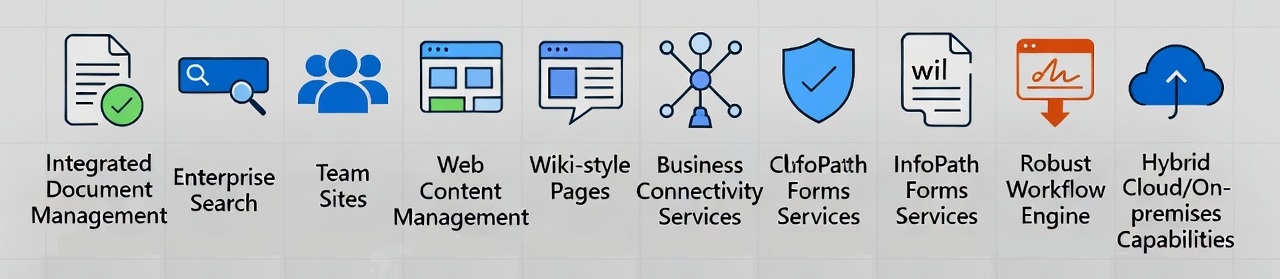
1. Integrated Document Management with Version Control and Check-In/Check-Out
From day one, SharePoint replaced the anarchy of mapped drives and email attachments with structured document libraries featuring versioning, metadata tagging, and check-in/check-out locking, all accessible from a standard web browser. For organizations drowning in files named “Final_v2_REALLY_FINAL.docx,” this was genuinely transformative. Version history meant you could roll back a document to any prior state. Check-out locking meant two people could not silently overwrite each other’s work. Metadata meant files could be found, filtered, and managed at scale. No competitor offered this level of document governance so tightly integrated with the Windows and Office ecosystem at the time.
🔗 SharePoint document libraries (Microsoft)
2. Enterprise Search and Indexing Across Documents and Portals
Building on Microsoft’s Index Server and Site Server lineage, SharePoint made unified search across documents, people, and portal content a core feature from launch, years before enterprise search became a recognized standalone product category. The ability to crawl, index, and query content across an entire organization from a single interface was genuinely pioneering. Later releases deepened this capability through FAST Search integration, people search, relevance tuning, and eventually Microsoft Search, which now surfaces SharePoint content intelligently across Teams, Outlook, and the broader Microsoft 365 suite.
🔗 Microsoft Search in SharePoint
3. Team Sites for Bottom-Up, Self-Service Collaboration

Joel Oleson, Owen Allen, Erica Toelle (not shown) and I planning for the SharePoint 2010 Launch Party in Seattle
SharePoint Team Services in 2001 introduced the concept of lightweight, self-provisioned team workspaces with shared document libraries, task lists, calendars, and discussion boards, and it did so without requiring IT to build or maintain anything. Departments and project teams could stand up their own collaborative environment in minutes. This democratized collaboration in a way that predated the “no-code” movement by nearly two decades. The modern Team Site, now provisioned automatically whenever someone creates a Microsoft Teams channel, carries this same philosophy forward at massive scale.
🔗 SharePoint team sites (Microsoft)
4. Integrated Web Content Management (WCM) and Publishing
With Microsoft Office SharePoint Server 2007 (MOSS), SharePoint became one of the first platforms to fully merge web content management with enterprise collaboration. Page layouts, publishing workflows, audience targeting, content approval, and structured intranet portals were all available within a single product. Organizations no longer needed a separate CMS for their intranet and a separate tool for team collaboration. This integration was a significant competitive advantage and set the template for how enterprise intranets would be built for the next decade and beyond.
🔗 SharePoint communication sites
5. Wiki-Style Pages and Modern Collaborative Editing
Starting in SharePoint 2007 and maturing meaningfully in 2010, SharePoint brought wiki-style page creation into the enterprise, enabling teams to build knowledge bases and collaborative documentation without any web development skills. The experience evolved through the Fluent UI Ribbon editor and eventually into today’s fully modern page authoring experience, built on a flexible web part model that is accessible to everyday users. The result is an authoring environment that rivals dedicated wiki and knowledge management products, while remaining tightly integrated with the rest of the Microsoft 365 toolset.
🔗 Modern pages in SharePoint (Microsoft)
6. Business Connectivity Services (BCS) and External Data Integration
Introduced as the Business Data Catalog in SharePoint 2007 and formalized as Business Connectivity Services in 2010, this feature allowed SharePoint to surface data from external line-of-business systems directly inside lists, search results, and forms. SQL databases, SAP systems, Salesforce records, and custom APIs could all be connected and presented to users without requiring custom development for every scenario. Bridging external data with the collaboration layer in a governed, consistent way was a meaningful differentiator for enterprises that could not afford to replicate data across systems or build bespoke integrations from scratch.
🔗 Business Connectivity Services overview (Microsoft)
7. Claims-Based Authentication and Federated Identity
 SharePoint 2010 introduced claims-based authentication, enabling single sign-on across diverse identity providers and laying the architectural groundwork for cloud federation. While not the most visible feature to end users, this quiet innovation made SharePoint genuinely enterprise-ready for complex hybrid environments and foreshadowed the identity-first architecture that now powers Microsoft Entra ID (formerly Azure Active Directory). Organizations with multiple directories, partner networks, or cloud ambitions found this capability essential, and it positioned SharePoint well ahead of many on-premises collaboration tools when the cloud transition accelerated in the following decade.
🔗 SharePoint and identity (Microsoft Entra)
8. InfoPath Forms Services for Browser-Based Forms
InfoPath Forms Services, debuting in SharePoint 2007, allowed organizations to deploy complex, data-connected business forms directly in the browser with no client-side installation required. Dynamic field behavior, cascading dropdowns, data validation, and workflow triggers were all accessible to power users without writing code. For the era, this was a remarkable achievement in no-download enterprise application delivery. Although InfoPath has since been retired in favor of Power Apps, it was an early and influential proof of concept for what low-code, browser-native process automation could look like at enterprise scale.
🔗 InfoPath history (Wikipedia)
9. Declarative Workflow Engine and Process Automation
SharePoint’s built-in workflow framework, introduced in 2007 and significantly extended through SharePoint Designer in 2010, brought structured process automation within reach of business users. Approval flows, document routing, conditional logic, and email notifications could all be configured visually without a developer involved. This was a genuine shift in who could automate business processes, moving that capability from the IT department to the people who actually understood the workflows. The lineage runs directly to Power Automate, Microsoft’s current automation platform, which now handles millions of SharePoint-triggered workflows daily and stands as one of the most widely adopted automation tools in the enterprise software market.
🔗 Power Automate and SharePoint
10. Hybrid Cloud/On-Premises Capabilities with Unified Search
As enterprises began their cloud journeys in the mid-2010s, many faced an uncomfortable reality: full migration to the cloud was not always possible or practical, particularly for organizations with regulatory constraints, large on-premises investments, or complex governance requirements. SharePoint 2016 and the evolving SharePoint Online service pioneered a practical hybrid model, delivering unified search, taxonomy, user profiles, and site experiences that spanned both on-premises servers and the cloud simultaneously. Organizations could begin their cloud transition without a disruptive rip-and-replace migration. No other major enterprise content management platform offered this level of continuity at the time.
🔗 SharePoint hybrid (Microsoft)
The Next 25 Years: SharePoint as the Foundation for Enterprise AI
If the first 25 years of SharePoint were about organizing, managing, and connecting content, the next 25 will be about making that content intelligent. Microsoft 365 Copilot, now embedded across Teams, Word, Outlook, and the broader Microsoft 365 suite, relies on SharePoint as its primary content source. When Copilot summarizes a document, drafts a proposal based on prior work, or answers an employee’s question about a company policy, it is reaching into SharePoint libraries, respecting SharePoint permissions, and relying on SharePoint metadata to understand what content is relevant and trustworthy.
 This reality makes the discipline SharePoint has championed for a quarter century more urgent than ever. Clean metadata matters. Permissions hygiene matters. Version history matters. Consistent taxonomy and content lifecycle management matter. AI is only as capable as the content it can access and understand. Poorly organized documents, orphaned sites, broken permission structures, and duplicate content do not just create friction for human users; they actively degrade AI output quality, regardless of how powerful the underlying model may be.
The organizations that treated SharePoint governance as a bureaucratic chore will find themselves at a disadvantage in the AI era. The organizations that invested in structure, stewardship, and thoughtful information architecture are now sitting on a well-organized knowledge foundation that AI can actually use effectively.
SharePoint’s 25-year journey from a file portal to the backbone of enterprise collaboration is, in many ways, the story of modern knowledge work itself. It has survived the shift from client-server to the web, from on-premises to the cloud, from portals to mobile-first experiences, and from static documents to real-time co-authoring. Now it stands as the content foundation for the AI transformation of the enterprise. For a platform that started as a humble Windows Server add-on in 2001, that is a remarkable place to be standing 25 years later.