
A Simple Framework for Deciding When Your Automation Needs More Structure
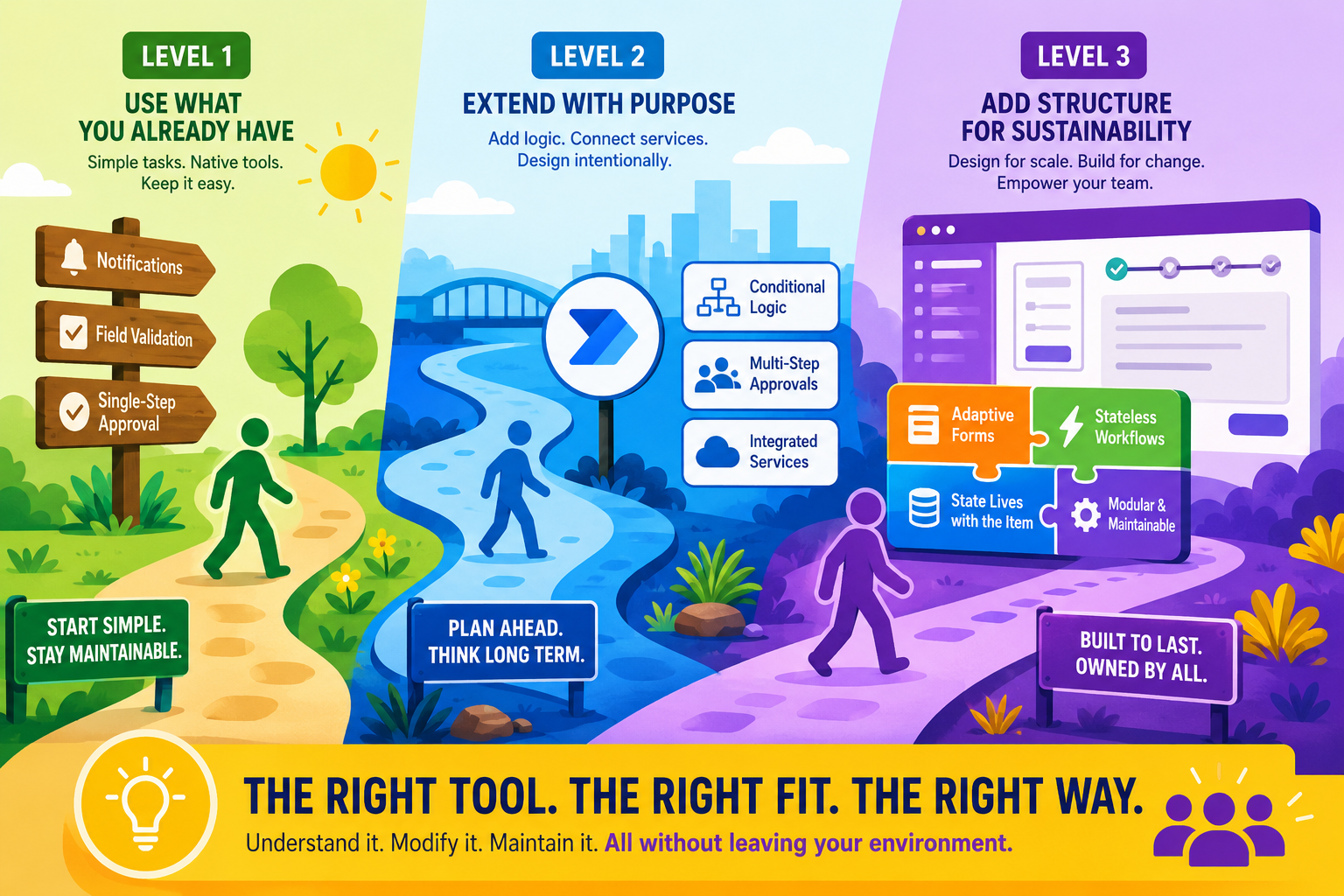
One of the things I appreciate most about the Microsoft ecosystem is that it genuinely does give you a lot of options. SharePoint rules, quick steps, Power Automate flows, Power Apps, Copilot agents. You can build almost anything. That flexibility is a strength.
But flexibility without a framework for making decisions is how you end up with automation sprawl: workflows scattered across tools, logic fragmented between systems, and nobody quite sure where all the pieces live. I have seen this enough times over 35 years in technology to know that the answer is not more tools or fewer tools. It is making deliberate choices about which tool fits which problem.
So here is a simple framework I have been using in conversations with customers and partners, and it has been remarkably effective at helping teams think through their automation decisions without overcomplicating things.
Level 1: Use What You Already Have
If your workflow involves simple notifications, basic field validation, or a single-step approval, SharePoint’s native rules and quick steps are the right choice. Full stop. Do not introduce additional tools when you do not need them.
I often think about it this way. Imagine you need to move something from one room in your house to another. You pick it up and carry it. You do not rent a moving truck, hire a crew, and spend half a day loading equipment just because those options exist. The same principle applies to automation. If the capability already exists in SharePoint, use it. Every additional tool you introduce carries its own maintenance, governance, and learning curve.
This is not about settling for less. It is about recognizing that the simplest solution is also the most maintainable. The person who builds it can explain it. The person who inherits it can modify it. The team that depends on it can understand it. Those properties are genuinely valuable, and they are easy to lose when you start adding complexity.
Level 2: Extend with Purpose
When you need conditional logic, multi-step approvals, or integration with other Microsoft 365 services, Power Automate is a natural next step. But the key phrase is “with purpose.” Treat the move to Power Automate as a design decision, not an inevitable escalation.
That means documenting the workflow’s logic before you build it. It means establishing clear ownership so that more than one person understands how it works. It means asking uncomfortable questions like: who will maintain this in six months? What happens if the builder is unavailable? Can someone on the business team still make routine changes?
If you skip those questions, you are not extending with purpose. You are just adding another layer of complexity and hoping it works out.
Level 3: Add Structure for Sustainability
There comes a point where multi-step approvals, dynamic forms, scheduled actions, and cross-system integrations begin to outgrow a collection of individual flows. At that stage, the conversation shifts from building workflows to designing an application that happens to automate work.
One approach I have seen work well is to place the user experience at the center of the design. Instead of asking people to jump between forms, emails, and multiple applications, the process stays within a single SharePoint experience. The form adapts to each stage of the workflow, presenting only the fields, actions, and validation rules that are relevant to that user at that moment. Each automation performs a specific task and then completes, while the underlying list or library maintains the current state of the process.
This architecture solves several problems at once. Users remain in a familiar environment, reducing training and support. Individual workflow actions are smaller and easier to understand, making them less fragile and simpler to update as business requirements evolve. Most importantly, the overall solution becomes easier to maintain because the process is organized around discrete, well-defined actions rather than one massive automation trying to do everything.
The important thing at this level is not which specific tool you choose. It is that you are choosing deliberately, with sustainability and shared ownership as primary design criteria.
The Question That Ties It Together
At every level, the deciding question is the same: can the team that depends on this workflow understand it, modify it, and maintain it without relying on a single person or leaving their working environment?
If the answer is yes, your current approach is probably fine. If the answer is no, you need more structure. Not necessarily more tools. Structure. That could mean better documentation, clearer ownership models, more accessible configuration, or a purpose-built solution that keeps everything in one place.
The goal is not to have the most sophisticated automation. It is to have automation that lasts, that your team can own, and that grows with your business instead of becoming the thing everyone is afraid to touch.